How to Collect Wedding Photos from Guests (2026 Guide)
WeddingSnap Team
5/31/2026
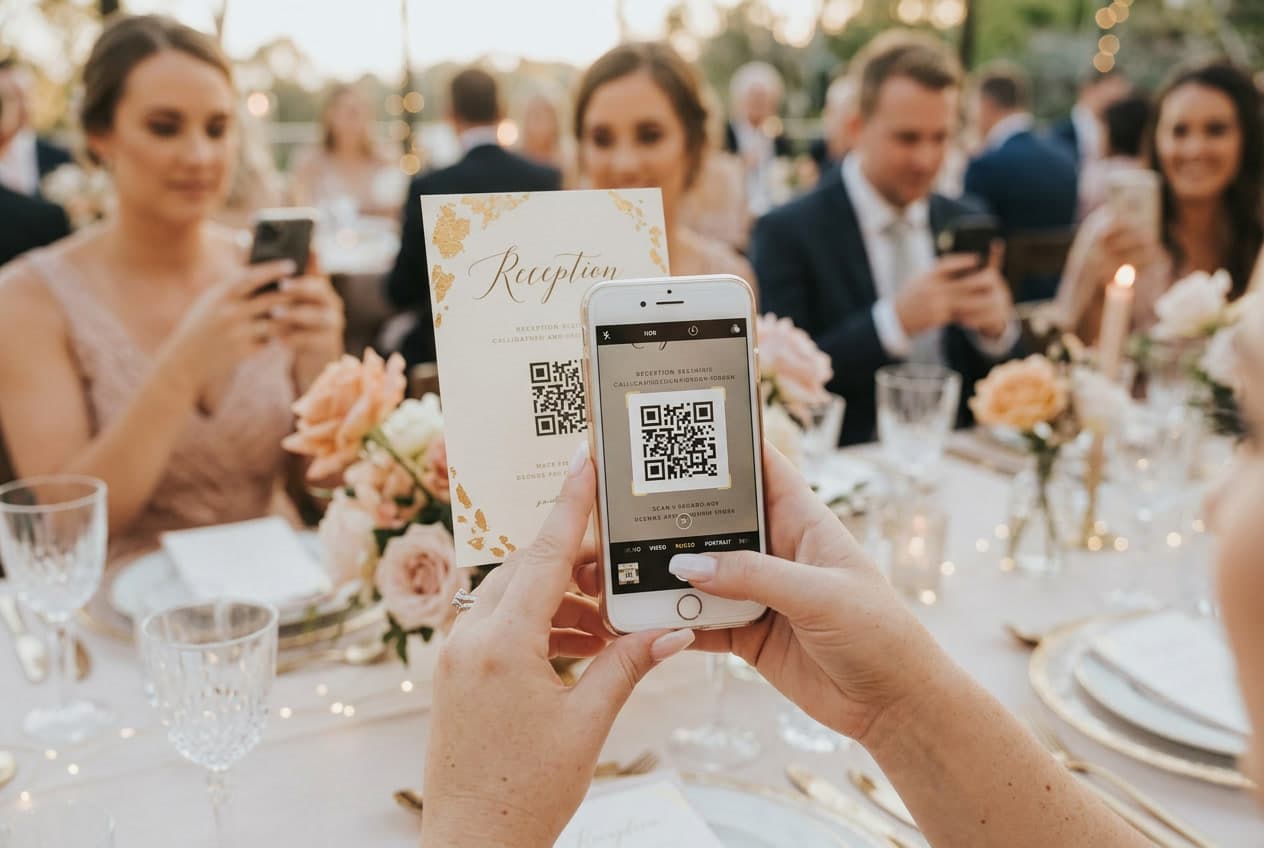
Your professional photographer will deliver somewhere between 600 and 1,000 edited images. Beautiful, yes. But here's the number nobody talks about: your guests collectively took somewhere between 5,000 and 8,000 photos at your wedding — and without a collection plan, you'll see fewer than 12% of them.
The dad crying during the first dance, photographed by the maid of honor from three rows back. The flower girl falling asleep on the ring bearer's shoulder during cocktail hour. Your college friends recreating a photo from freshman orientation while you were off doing portraits. These moments exist only on someone's camera roll — and they disappear within a few months when phones get replaced and photos get buried.
At WeddingSnap, we track how couples set up photo collection for their events. Our data shows that Saturday weddings — which make up nearly 2 in 3 events on our platform — are the ones most at risk of uncollected guest photos, simply because guests are more relaxed, more distracted, and more likely to take candid shots they never remember to send. April, May, and June together account for more than half of all the weddings we see, and that spring rush is exactly when couples are most scrambling to get their photo plan together.
This guide covers every method that actually works for collecting wedding photos from guests — ranked by effectiveness, not by how pretty they look on a planning blog.
Why You're Probably Missing Thousands of Photos
Professional wedding photographers are exceptional at what they do. But they're one person covering a multi-space event with competing priorities. The cocktail hour alone — while the couple is off doing portraits — generates hundreds of guest photos that no photographer captures.
The breakdown looks something like this:
- Your photographer captures 50–80 photos during cocktail hour
- Your guests capture 800–1,500 photos during that same hour
- Without a collection system, you'll see roughly 8–12% of those guest photos
It's not that guests are stingy — it's that there's no system. Ask someone to text you their photos and they mean to do it. Life gets in the way. The window to retrieve candids closes fast.
Research consistently shows that nearly a third of couples wish they'd done something different about photo coverage after their wedding. The fix isn't always hiring a second photographer — it's having a reliable system to collect what guests already took.
The 5 Best Methods to Collect Wedding Photos from Guests
Not all methods are equal. Here's an honest breakdown of what works, what doesn't, and why.
1. QR Code Photo Sharing — The Clear Winner
A QR code at your venue lets guests scan, upload instantly, and move on with the party. No app download. No account creation. No remembering a link later. It's a 15-second interaction that happens in the moment, while guests still have their phones out.
This is the approach we've built WeddingSnap around, and the data backs it up: couples using a QR-based photo collection consistently report receiving 300–500+ photos from guests, with larger weddings regularly crossing 800 uploads.
What to look for in a QR photo sharing platform:
- No app required — any friction kills participation. If guests have to download something, you lose at least 40% of uploads immediately.
- Both photos and videos — guests capture moments in video format just as often as photos.
- Instant access after the event — you should be able to log in the morning after and see everything.
- Private album — your wedding should be accessible only to people who have your link, not the public internet.
For a full walkthrough of how QR code wedding photo sharing works, see our guide to wedding QR codes — covering everything from setup to sign placement in detail.
2. Shared Google Photos or iCloud Album
Free, reliable, and already on most phones. For a small, tech-comfortable guest list, this works well. The problems emerge at scale: Google Photos requires a Google account, and iCloud only works smoothly for iPhone users. Both require guests to remember a link and act on it proactively — which most don't.
For a typical 100–200 person wedding, expect to collect 20–40% of the photos you'd get with a dedicated QR platform. For more alternatives, our guide to wedding photo sharing without an app covers every no-download option in depth.
3. A Wedding Hashtag on Instagram
Instagram hashtags peaked as a wedding photo collection strategy around 2018–2020. In 2026, the biggest problem is private accounts — more than half of Instagram users have private profiles, so their tagged photos are invisible to you unless you follow them. Content also disappears quickly in feeds and stories, and strangers occasionally tag into your hashtag.
Use hashtags as a bonus social layer on top of a real collection system, not as the system itself. They're great for real-time buzz, unreliable for actually keeping every photo.
4. Disposable Cameras on Tables
Still beloved — and for good reason. There's something about a disposable camera that makes guests take genuinely candid shots they'd never stage for their phone. But the math is rough: at $15–25 per camera including development, with 27 exposures and maybe 15–18 usable shots each, you're paying $1–2 per usable photo versus pennies per photo with a digital QR system. Development takes 1–2 weeks.
Disposable cameras are worth doing as a fun element at the reception tables — not as your primary strategy. For a full comparison, read our breakdown of QR codes vs. disposable cameras at weddings.
5. WhatsApp Group or Group Text
Works well for close family and your wedding party. Falls apart at 100 guests. WhatsApp compresses images aggressively, meaning you get lower-resolution versions of everything. Group texts bury photos in conversation threads and make it hard to find things later. Use this for your inner circle — not as your primary collection method.
How to Set Up QR Code Photo Collection (Step by Step)
Setting up a guest photo collection system takes about 10 minutes. Here's the process:
- Create your event. Sign up at WeddingSnap and create a new event with your wedding date, name, and expected guest count. Your unique QR code and upload link are generated automatically.
- Test it yourself. Scan your QR code and upload a test photo. You're experiencing exactly what guests will experience — if anything feels clunky, you'll find out now instead of on your wedding day.
- Get your signs printed. Download a free sign template from our template library and print at any local shop. Use 5x7 for tables, 8x10 or larger for venue entrances.
- Place signs strategically. Best placements: the ceremony exit, the cocktail hour bar, and each reception table. Guests should encounter the QR code at least twice during the event.
- Brief your MC. Ask them to mention the QR code during the welcome speech and again just after dinner, when phones are back out. One MC mention can double your upload count.
- Check your dashboard the morning after. Log in to browse every upload, download the full collection, and start curating your favorites.
For a deeper dive into the setup, see our detailed guide on how to make a QR code for wedding photos.
How to Actually Get Guests to Submit Their Photos
Setting up the collection system is the easy part. Getting guests to use it is where most couples leave photos on the table. The difference between a couple who collects 50 photos and one who collects 500 almost always comes down to one thing: how many times they reminded guests about it.
Before the wedding:
- Mention it at the rehearsal dinner — "We have a QR code for sharing photos at the reception, look out for the signs."
- Include a one-liner in your wedding website or program: "Share your photos with us — scan the QR code at the reception."
At the venue:
- Place QR signs at eye level at multiple locations. A sign they see three times is one they actually scan.
- The ceremony exit is prime real estate — guests are standing around, emotions are high, and phones are already out for photos.
- Put a small card with the QR code at each place setting for the dinner window.
During the reception:
- MC announcement during the welcome speech and again after dinner. "Scan the QR code on your table to share your photos with [Name] and [Name]" is perfectly sufficient.
- If you have a photo booth, place the QR sign right next to it — guests already have phones out.
After the wedding:
- Include a reminder in your thank-you cards. "P.S. — if you took any photos that night, we'd love to have them: [link]" recovers a meaningful number of late uploads.
For creative ways to work guest photo sharing into the overall experience, our wedding guest photo ideas guide has angles most couples haven't considered — including photo scavenger hunts and photo challenges that drive uploads organically.
What to Do With Guest Photos After Your Wedding
Once you have 300, 500, or 800 guest photos in your collection, the next challenge is organizing them into something you'll actually return to.
Curate before you archive. Go through your guest uploads within the first week while memories are fresh and mark your top 50–100 favorites. These become the core of any print or album project you do later.
Integrate with your professional photos. Create a combined folder of your favorite 150–200 images from both sources. Professional shots give you polished portraits; guest photos give you the candid angles no photographer could reach. They're better together.
Back up to at least two places. Download everything from your collection platform and store it in both cloud storage (Google Photos, iCloud, or Dropbox) and a physical external drive. Wedding photos from 2026 should still be accessible in 2046. Cloud services change; platforms discontinue.
Consider a guest photo album. A printed photo book of curated guest candids makes an incredible keepsake — different from the professional album, and often the one couples actually flip through most. Our guide to wedding guest book photo albums covers the formats worth considering.
For choosing the right long-term platform for storing and sharing your full wedding collection, see our 2026 comparison of the best wedding photo sharing apps.
Common Mistakes to Avoid
After seeing how hundreds of couples approach this, a few patterns show up consistently among those who end up with fewer photos than expected:
- Setting it up the week of the wedding. Two weeks minimum — you need time to print signs and test the upload flow without last-minute stress.
- Using a platform that requires guests to download an app. Every extra step costs you uploads. No-download platforms consistently collect 2–3x more photos than app-required ones.
- Only putting up one QR sign. Guests who don't walk past that one spot never see it. Multiple sign placements are the difference between 50 and 500 uploads.
- Not briefing the MC. The MC announcement is one of the highest-leverage actions you can take. Two mentions during the reception is the target — it's the single biggest driver of upload volume.
- Waiting too long to download. Most platforms retain photos for a limited period. Log in within 48 hours and download the full archive to your own storage.
Which Method Should You Use?
For most couples: a dedicated QR code photo sharing platform is worth the cost. At $29–99 for a single event, it's less than two hours of additional photographer coverage — and it often delivers more unique images than a second shooter would capture, because no human can be simultaneously at every table, every corner of the dance floor, and outside the bathroom where the bridesmaids are having the real conversations.
Guest photos are a completely different category of memory. They're the party from inside the party. Your grandmother's perspective. Your college friends' perspective. The nephew who spent the whole reception photographing the dessert table. No photographer is capturing that, and no hashtag reliably retrieves it later. A QR code placed in the right spots, announced twice, fills that gap without any effort from you on the day.
For inspiration on what other couples have done to make guest photo moments special — from wedding photo scavenger hunts to interactive sign ideas — our wedding guest photo ideas guide is worth reading before your event.
Frequently Asked Questions
When should I set up guest photo collection for my wedding?
At least two weeks before your wedding. That gives you time to print signs, test the upload flow with a friend, and troubleshoot anything before the day. The setup itself takes under 10 minutes — it's the sign-printing logistics you want handled well in advance.
What if some of my guests don't have smartphones?
Most weddings have a small number of guests — typically older relatives — who won't use a QR code. Put a disposable camera at the tables where those guests are seated. You get candid analog shots for a handful of moments without losing digital collection for the rest of your 100+ guests. Don't let the 5% exception become a reason to skip the system for everyone else.
Is a paid guest photo sharing app worth it?
Yes — if you actually want to receive those photos. Free options like Google Photos shared albums and Instagram hashtags recover only a fraction of guest photos because they create friction or require accounts guests don't want to log into at a party. Dedicated platforms with QR codes consistently deliver 5–10x more photos than free alternatives. At $29–99 for a single event, it's one of the better investments in wedding memories.
Can I collect videos from guests, not just photos?
Yes — WeddingSnap and most modern platforms accept both photos and videos uploaded via QR code. Guests can share short clips of toasts, first dance reactions, and dance floor moments the same way they share photos. Video is increasingly where the best candid moments live, so confirm your platform supports it before committing.
How do I keep my wedding photos private?
Use a platform tied to your unique QR code, not a public hashtag. With WeddingSnap, your album is private by default — only guests who scan your personal QR code can upload or view photos. Your wedding stays off the public internet.
Want the photos to do more than fill an album? You can put guest photos on a live reception screen as they arrive.
Ready to set it up? Creating a WeddingSnap event takes under 10 minutes, and your guests will fill your album during the reception whether you're watching or not. See WeddingSnap's plans — most couples only ever need one event.