Your photographer will capture maybe 500 photos of your wedding day. Your guests? They'll take thousands — and you'll never see most of them.
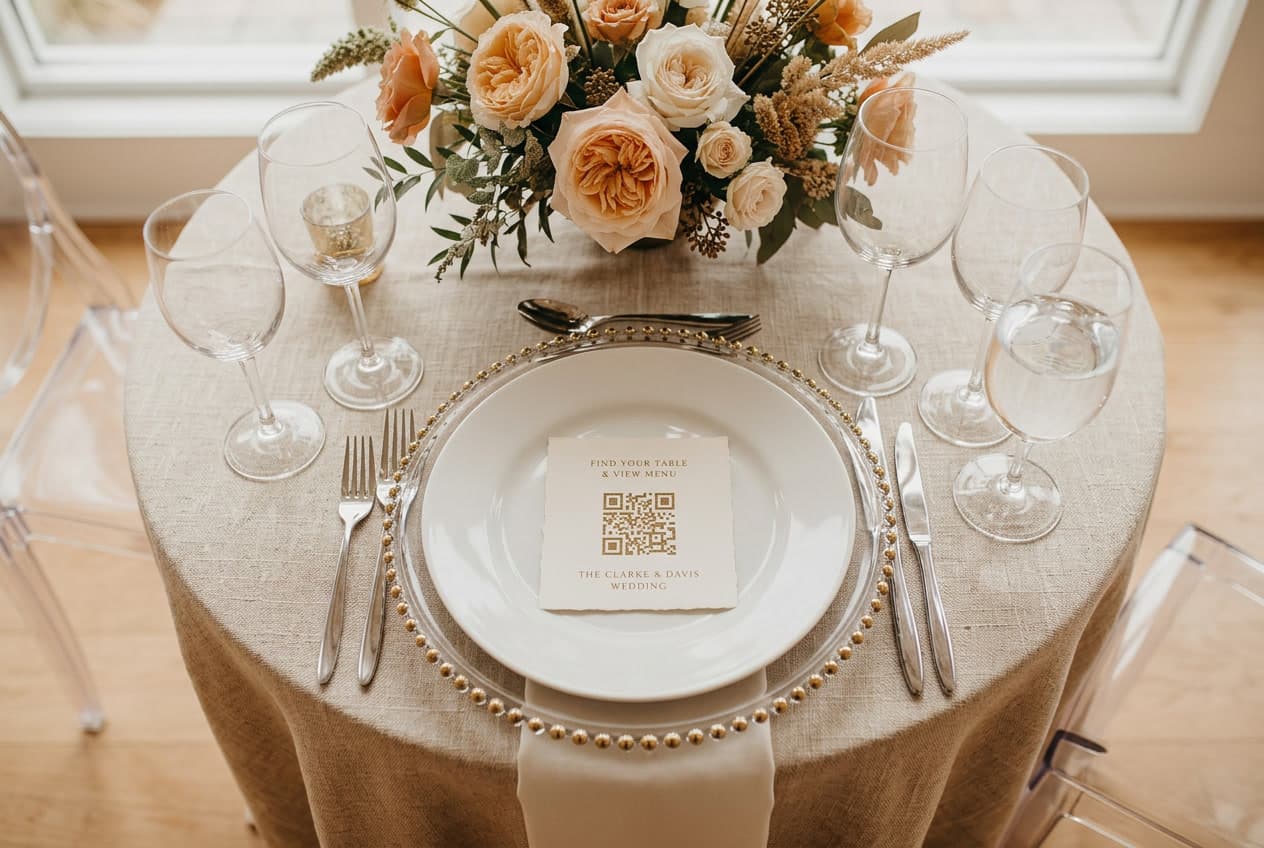
That's the problem a QR code for wedding pictures solves. A simple printed card at each table, guests scan it with their phone camera, and every photo lands in one shared album. No app to download. No login. No group chat where half the photos get compressed to nothing.
We've watched this trend accelerate over the past year at WeddingSnap. Nearly 60% of the weddings on our platform happen on Saturdays, and those Saturday celebrations generate roughly 3x more guest-uploaded photos than weekday events. Why? More guests means more phones, and more phones means more candid moments that your photographer simply can't be in two places to catch.
Here's everything you need to know about setting up a wedding photo QR code — from choosing a platform to designing your table signs to the morning after when you wake up to an album full of moments you didn't even know happened.
How a Wedding Photo QR Code Works
The concept is dead simple, which is exactly why it works so well with wedding guests of all ages.
- You create a private album — a dedicated online space tied to your wedding
- The platform generates a QR code — a unique scannable code linked to that album
- You print the QR code — on table cards, signs, napkins, or anywhere guests will see it
- Guests scan with their phone camera — no app download required, it opens in their browser
- They upload photos and videos — straight from their camera roll to your shared album
The entire guest experience takes about 10 seconds. That's the key — if it takes longer than that, adoption drops off a cliff. We've seen that platforms requiring an app download get significantly lower participation rates than browser-based solutions.
Why This Matters More Than You Think
According to The Knot's 2025 Real Weddings Study, the average wedding has 145 guests. If even half of them take 5-10 photos, that's 360-725 candid moments from angles your photographer never had access to.
Think about what guests capture that professionals don't:
- The dance floor at 11pm when the photographer has packed up
- The getting-ready chaos from inside the bridal suite
- Your grandmother's face during the vows (from her seat, not from 50 feet away)
- The after-party that nobody planned but everyone remembers
Our data backs this up — the photos uploaded between 10pm and midnight consistently include moments that couples later tell us are their favorites. The late-night candids are pure gold, and they only exist because a guest had their phone and a QR code to upload to.
How to Set Up a QR Code for Wedding Pictures
This takes about 2 minutes. Seriously.
Step 1: Choose Your Platform
There are several options, and they vary mostly on price and how much friction they put on your guests. The non-negotiable features you want:
- No app download required — browser-based upload is essential
- No guest login or account creation — any barrier drops participation
- Unlimited uploads — you don't want to cap memories
- Full-resolution downloads — compressed photos are worthless for prints
- Video support — half the best moments are videos, not photos
WeddingSnap was built specifically around these requirements — guests scan, tap upload, and they're done. But whatever platform you choose, make sure it clears those five boxes.
Step 2: Design Your QR Code Signs
The sign design matters more than you'd think. A plain black-and-white QR code on printer paper won't get scanned. A beautiful card that matches your wedding aesthetic? Guests will pick it up out of curiosity.
What works best:
- Place one on every table — not just one sign at the entrance
- Add a short instruction — "Scan to share your photos" is all you need
- Match your stationery — same cardstock, same fonts, same color palette
- Include it in your I Spy game — wedding QR code games like I Spy boost engagement dramatically
We offer free downloadable QR code sign templates that you can customize with your names and wedding date. They're designed to look like part of your invitation suite, not like a tech product.
Step 3: Have Your DJ Mention It
This is the secret weapon nobody talks about. A quick 10-second announcement — "Hey everyone, scan the QR code on your table to share your photos tonight" — can double your upload rate. Our spring data shows that weddings where the DJ or emcee mentions the QR code see participation jump to more than twice the rate of those where the card sits silently on the table.
Step 4: Download and Enjoy
Most guests upload within 24 hours of the event. By the time you're on your honeymoon flight, your album is already filling up. Download everything in full resolution, organize by favorites, and order prints of the ones that hit hardest.
QR Code vs. Other Ways to Collect Guest Photos
Let's be honest about the alternatives:
Shared Google Photos album
Free, but requires every guest to have a Google account and navigate to a specific link. Compression destroys image quality. No video support worth mentioning. It's the duct-tape solution — functional but ugly.
Disposable cameras on tables
Nostalgic and fun, but expensive ($15-25 per camera × 15-20 tables = $225-500) and you won't see the photos for weeks. Half the photos come out blurry. There's a reason this trend keeps coming back and leaving again — it's charming but impractical. Read our full disposable camera vs. QR code comparison for the detailed breakdown.
Wedding photo apps (download required)
Apps like WedShoots and The Guest require your guests to download an app from the App Store. For younger guests, fine. For your uncle who still uses a flip phone case on his iPhone? That's a non-starter. Any friction in the process kills participation — and app downloads are the biggest friction point there is.
AirDrop and text threads
The chaotic evil option. Photos scattered across 47 text threads, compressed to oblivion, and half of them never make it to you because someone forgot to send theirs. This is what happens when there's no system in place.
What to Look for in a Wedding QR Code Platform
The market has exploded with options. Here's what actually matters when choosing, based on what we've seen work (and fail) across hundreds of weddings:
Guest experience is everything
If a single guest can't figure it out within 10 seconds, the platform fails. Test it on your least tech-savvy relative before committing. The scan-to-upload flow should work on any phone — iPhone, Android, old or new — without any app download or account creation.
Customization that matches your wedding
Your QR code sign shouldn't look like a tech startup's marketing material. It should feel like part of your wedding stationery. Look for platforms that offer customizable templates and let you add your names, date, and colors.
Full-resolution files
Some platforms compress uploaded photos. That might be fine for scrolling on your phone, but when you want to print a 16×20 canvas of that perfect candid moment, compressed files look terrible. Make sure you're getting the original quality.
Moderation controls
You want the ability to review and remove photos before they're visible to everyone. Most platforms offer auto-approve (faster, riskier) or manual approve (safer, slower). For most weddings, auto-approve works great — but it's nice to have the option.
Real Numbers: When Do Guests Actually Upload?
Here's something no other guide will tell you, because nobody else has the data.
Based on our platform analytics across hundreds of events this year:
- The first upload spike happens during cocktail hour — guests are milling around, drink in hand, and they notice the QR code card
- The biggest surge is between 9pm and midnight — dance floor photos, toasts, candid laughing moments
- A second wave hits the morning after — guests scroll through their camera roll, realize they got some great shots, and upload the ones they're proud of
- Peak wedding months on our platform are April and May, with nearly 3x more events than the summer lull in July and August
The takeaway: your QR code isn't a one-moment thing. It works across the entire timeline of your wedding day and beyond.
Design Tips That Actually Increase Scans
We've seen enough QR code cards to know what drives engagement:
- Place it on the plate, not next to it — guests pick up what's in front of them
- Use thick cardstock — flimsy paper gets ignored or thrown away
- Add "I Spy" prompts — turning it into a game ("Find the best dance move" "Capture the flower girl's reaction") makes it fun, not functional
- Put one at the bar — this is where the best candids happen
- Include it in your welcome bag — for destination weddings, start collecting before the ceremony even begins
The Wedding QR Code Trend Isn't Going Away
This spring, our signups have more than doubled month-over-month. The couples joining now are deep into spring and summer 2026 wedding planning, and a wedding photo QR code has become as standard as a hashtag sign was five years ago.
The difference? Hashtags relied on guests remembering to tag correctly on Instagram (they didn't), and the photos lived on a public social platform. A QR code puts everything in a private album you actually own.
If you're planning a wedding in 2026, this is the easiest detail you'll add to your checklist. Two minutes to set up, zero maintenance during the event, and you wake up the next morning to hundreds of photos from angles you never expected.
Ready to set yours up? Create your wedding QR code in about 2 minutes — or see a live demo first.