Live Wedding Photo Slideshow: Guest Photos on Screen (2026)
WeddingSnap Team
6/29/2026
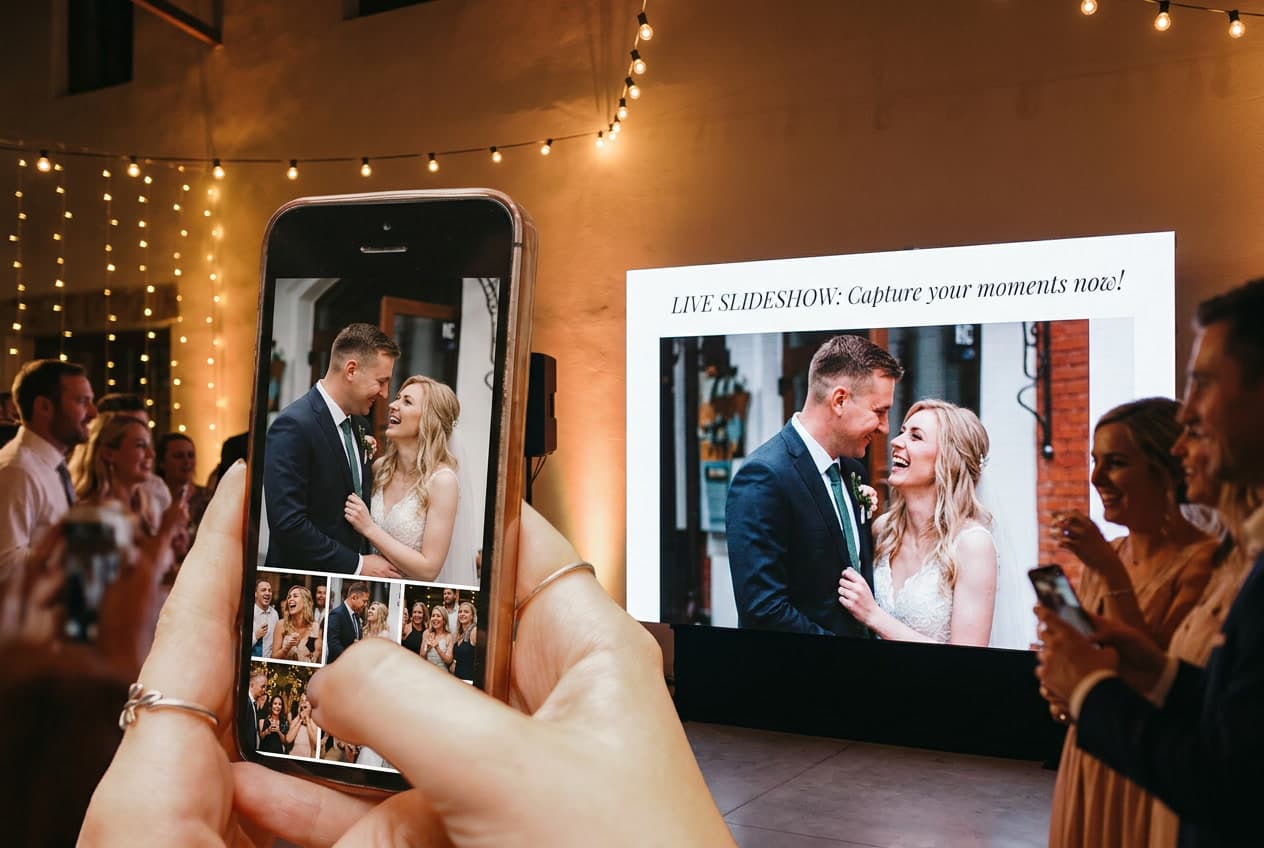
Picture the dance floor mid-song. A guest snaps a blurry, laughing photo of your grandmother twirling your nephew. Ten seconds later, that exact photo glows on the big screen behind the band — and the whole room turns to point and cheer.
That moment is what a live wedding photo slideshow does. Instead of a pre-made montage of baby pictures, the screen fills with photos your guests are taking right now, as the night unfolds. It has quietly become one of the most-requested reception touches of 2026, and the setup is far simpler than most couples assume.
This guide walks through exactly what a real-time wedding slideshow is, why couples are choosing it over the old DVD-style montage, and how to get one running on a screen at your reception.
What is a live wedding photo slideshow?
A live wedding photo slideshow is a display — a TV, a projector, a tablet — that shows guest photos on a screen at the reception the moment they're uploaded. No flash drive, no laptop, no "final cut."
Guests scan a QR code on their table, snap or pick a photo from their phone, and it appears in the rotation within seconds. The slideshow keeps cycling all night, growing photo by photo as the celebration happens around it.
This is a different thing from the classic wedding slideshow, which is a fixed video of childhood and engagement photos set to music. Both are lovely. But the live version captures the day as it actually feels — candid, messy, joyful — instead of a polished recap of the years before it.
And the trend is riding a real wave. Weddings are clustering hard into peak season: on our platform, roughly half of all weddings happen across April through June, with May the single busiest month. That's a lot of packed dance floors looking for one more reason to light up.
Why couples are putting guest photos on a screen at the reception
The pull isn't the technology. It's the feeling. Here's what couples tell us draws them in:
- It turns guests into the entertainment. People love seeing their own photo hit the big screen. It becomes a game — everyone trying to get the funniest, sweetest shot featured.
- It pulls in the wallflowers. The aunt who'd never hit the dance floor will absolutely take a photo and watch for it. Suddenly she's part of the show.
- You see your own wedding while it's happening. Couples are notoriously too busy to take photos at their own reception. The screen hands the day back to you, in real time.
- You collect the candids you'd otherwise lose. Every photo on that screen is a photo you keep — the ones that usually vanish into guests' camera rolls forever.
That last point is the quiet reason this matters most. Wedding planning sites like The Knot have long flagged how many guest photos never reach the couple. A reception screen fixes that by giving people a reason to upload during the party, not "someday" after.
How to set up a live wedding photo slideshow
You don't need an AV team. The whole thing comes together in about two minutes once you know the steps.
Step 1: Choose your photo-collection tool
You need a platform that does two jobs at once: collects guest photos through a wedding QR code and displays them live on a screen. Not every photo app offers the live display, so confirm that specific feature before you commit.
Step 2: Create your gallery and QR code
Set up your event, and the platform generates a single QR code that collects every photo and video from every guest. With WeddingSnap, this takes about two minutes — no app for guests to download, no accounts to make. It all runs in the phone's browser.
Step 3: Put the QR code where guests will see it
Print it on table cards, the welcome sign, the bar, the back of the menu. The more often guests see it, the more they scan. (Need the how-to? Our guide on making a QR code for wedding photos covers the details.)
Step 4: Open the slideshow on your screen
On the device connected to your TV or projector, open the gallery's live view. WeddingSnap's Live Slideshow lets you play your gallery on a screen and watch new photos appear live as guests upload them — no refreshing, no babysitting.
Step 5: Connect to the reception screen
Cast or plug the device into your venue's TV or projector. Set it to fullscreen, dim nothing else, and let it run. New photos slide in on their own all night long.
What you'll need on the day
The hardware list is refreshingly short:
- A screen. A TV, monitor, or projector. Many venues already have one — ask your coordinator first.
- A device to run it. A laptop, tablet, or streaming stick connected to that screen.
- Wi-Fi or strong cell signal. The screen needs a connection to pull in new photos. Check your venue's signal during the walkthrough.
- Your QR codes, placed everywhere. Visibility is the whole game.
That's it. No special projector, no editing software, no rendering a video the week before your wedding.
Tips for a real-time slideshow that actually pops
- Place the screen where people gather. Near the bar, the dance floor, or the dinner tables — not tucked in a hallway. It should be impossible to miss.
- Prime the pump early. Encourage a few photos during cocktail hour so the screen is already alive when guests sit down.
- Add it to your reception flow. A quick line from the DJ — "scan the code and get yourself on the big screen" — works better than any printed sign.
- Let it run past the last dance. The best candids often come late. Keep collecting even after the slideshow display shuts off.
- Pair it with other interactive moments. It plays beautifully alongside the rest of your wedding reception entertainment ideas — photo booths, late-night snacks, a great band.
One more thing worth knowing: roughly 80% of weddings on our platform fall on a Friday or Saturday, with about 60% on Saturday alone. If you're marrying on a peak night, your venue's screen and Wi-Fi may be in high demand — confirm both early so nothing surprises you.
What happens to the photos after the party?
The live screen is the fun part. The keepsake is the payoff. Every photo guests upload lands in one shared gallery you keep long after the lights come up.
With WeddingSnap, that gallery also turns those uploads into an auto-generated, polaroid-style video recap with warm film grain — so the night replays itself without you lifting a finger. If you want the full picture of pulling everything together afterward, our guide to collecting wedding photos from guests walks through it.
And if you've hired a content creator for the day, a live gallery gives them a real-time feed to pull from too — a natural fit with the rise of the wedding content creator.
How much does a live wedding slideshow cost?
It varies by platform, but it shouldn't require a subscription. WeddingSnap is a one-time $39.99 — unlimited photos and videos, 50GB of storage, a full year of access (and your photos stay downloadable after that), plus a 30-day money-back guarantee. The live slideshow is included, not a paid add-on.
Compared to renting AV gear or hiring someone to build a montage, a browser-based live slideshow is the low-effort, low-cost option that also happens to be the most fun.
Put your guests' photos on the big screen
Set up your live wedding photo slideshow in about two minutes — one QR code, every guest photo and video, appearing on screen in real time.
Frequently asked questions
Do guests need to download an app for the slideshow?
No. With WeddingSnap, guests scan a QR code and upload right from their phone's browser — no app, no account. That low friction is what keeps photos flowing onto the screen all night.
Will photos appear on the screen instantly?
Just about — new uploads join the live rotation within seconds, as long as your display device has a solid Wi-Fi or cell connection.
Can I control which photos show up?
Setups vary by platform. The simplest live slideshows display uploads automatically; some tools add moderation if you'd rather review first. Check the feature list before the big day.
What if my venue doesn't have a screen?
Most can provide a TV or projector, or you can rent one. In a pinch, even a large monitor near the bar does the job. For broader inspiration, sites like Green Wedding Shoes and Zola have plenty of reception display ideas.
Do the photos disappear after the wedding?
They shouldn't. With WeddingSnap, every photo and video lives in one shared gallery for a full year, and stays downloadable even after the access window closes.