The Complete Guide to Wedding QR Codes (2026)
WeddingSnap Team
5/19/2026
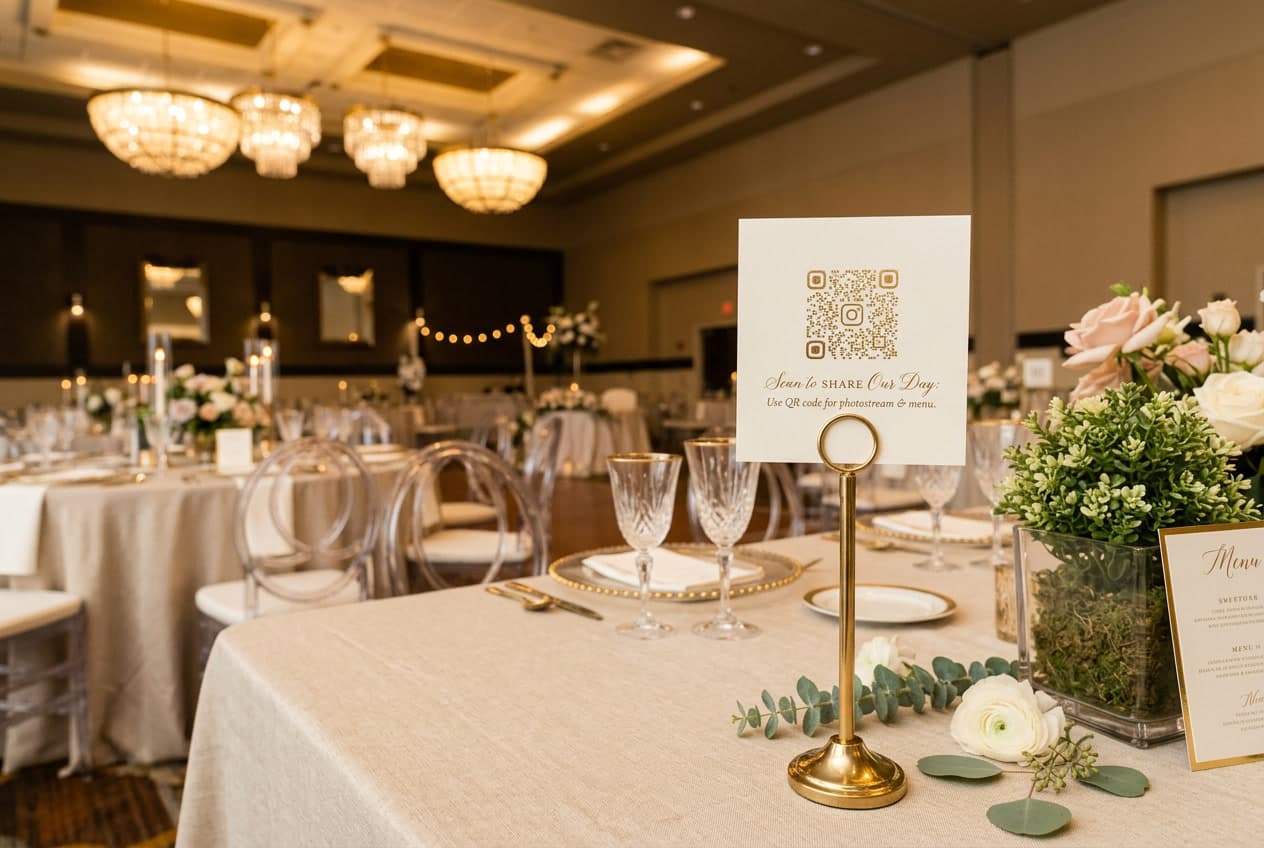
After the reception ends, the average couple receives photos from maybe a dozen guests. The rest — the candid moments, the tearful toasts, the dance floor chaos — live on 200 different phones and quietly disappear into camera rolls that never get shared.
A wedding QR code fixes this. Guests scan, upload, and you end up with every photo in one place. The concept is simple. The execution is where couples get stuck: which platform to use, how to display it, what to print, how to get guests to actually use it.
That's what this guide covers — setup, placement, platform selection, and the mistakes that cause couples to end up with almost nothing in their album.
What a Wedding QR Code Actually Does
A wedding QR code is a scannable image displayed at your venue. Guests point their phone camera at it, tap the notification that appears, and land on a browser page where they can upload photos directly to your private album. No app download. No account. No friction.
The QR code is generated by your photo sharing platform. It points to a unique URL tied to your specific event. Every upload goes into one album that only you control.
That's the whole mechanism. The reason it's become standard at weddings in 2026 is that phone cameras now read QR codes natively — no separate QR scanner app needed. The barrier to scanning is effectively zero. Any guest with a modern smartphone can use it without any instruction beyond a simple sign.
Why More Couples Are Using Them in 2026
Wedding photography has changed. Most guests arrive with a camera in their pocket that shoots in 4K and captures 12-megapixel stills. The raw volume of photos taken at a modern wedding has never been higher. The number that actually make it to the couple? Historically low — because there was no frictionless way to collect them.
Social media made it worse. Guests used to email photos or hand over a memory card. Now they post to Instagram and the couple gets a tagged notification, not the full-resolution file.
Our data at WeddingSnap reflects how rapidly this has shifted. More than 6 in 10 weddings on our platform happen on Saturdays — matching the traditional peak day — but the spring surge is what stands out. April and May together make up the single biggest new-event surge we see all year, with spring bookings outpacing winter months by nearly 3 to 1. May alone runs nearly 6x the January volume in new event signups. Couples are setting this up months in advance, not as an afterthought.
The Knot's annual wedding study consistently ranks guest experience among the top priorities for modern couples. Photo collection is one of the clearest pain points in the post-wedding period — couples regularly cite it as something they wish they'd prepared for better.
How to Set Up a Wedding QR Code (Step by Step)
Setup takes two to five minutes on a dedicated platform. Here's exactly how it works — and what to watch for at each step.
Step 1: Choose a platform built for this
Don't use a generic QR code generator. Those create a scannable link — but you still need somewhere for the photos to actually go. You want a platform that handles the upload interface, album storage, privacy controls, and guest experience for you.
What to check before committing to a platform: Does the guest upload flow work entirely in the browser? No app required? Can guests upload without creating an account? Does the platform offer bulk download after the wedding? We cover platform selection criteria in depth below.
Step 2: Create your event
Most platforms ask for your event name, date, and an optional welcome message. Keep the welcome message short and direct. "Snap a photo? Upload it here so we get every moment." Guests don't read long instructions at a reception.
On the question of passwords: gallery passwords sound like a smart privacy measure, but they kill participation. If guests have to enter a password mid-reception — especially one they only saw once on a table card — most will give up. Leave the gallery open, or use something obvious like your last name.
Step 3: Download your QR code
After creating the event, download the QR code image. SVG format is better for large prints — it stays sharp at any size. PNG works fine for digital displays and smaller prints.
Step 4: Design your sign
You have a few paths here:
- Free templates — WeddingSnap offers free QR code sign templates in minimal, botanical, classic, and modern styles. Download, add your code, print.
- DIY in Canva — drop the QR code PNG into any template. Print 5×7 or 4×6 at home or through a print-on-demand service.
- Ordered printed signs — Etsy sellers and print services offer acrylic, wood, and paper signs with your code. Budget $15–40 for a quality sign.
- Venue digital displays — some venues have screens at the bar or entrance that can cycle your QR code during cocktail hour. Ask your venue coordinator. You can also display guest photos on a screen in real time as they upload.
For a detailed walkthrough of the sign-making process, see our guide on how to make a wedding QR code.
Step 5: Test it before the wedding
Scan your own code the week before. Upload a test photo. Confirm it lands in your album. This takes 90 seconds and is the single step most couples skip. Test on both iOS and Android if you can — some upload flows behave differently across operating systems.
Step 6: Brief a point person
Tell your day-of coordinator, a bridesmaid, or the DJ what the QR code is and where the signs are. If a guest has trouble — an older aunt who's unfamiliar with QR codes — someone on-site should know to help. This rarely comes up, but having a point person takes the pressure off.
Where to Display Your Wedding QR Code Sign
Placement drives participation more than any other factor. Couples who display in one location collect a fraction of the photos compared to couples who use multiple touchpoints across the day.
Cocktail hour: your best window
This is consistently the highest-converting moment. Guests are relaxed, phones are already out, and there's natural social energy. A 5×7 sign on each cocktail table — or a larger acrylic sign at the bar — works well. Some couples coordinate a 10-second mention from the host or MC: "There's a QR code on each table — scan it to drop your photos right into their album." That one verbal mention reliably doubles upload volume.
Reception tables
Small tent cards or table cards with the QR code work well as understated decor. Guests see them during dinner, between courses, and during toasts — multiple moments of exposure. This is the second-best window for uploads, and the highest-ROI addition if you're only putting signs in two places.
The bar
People wait at the bar. They're on their phones. Acrylic tent cards work well here — durable, clean-looking, and highly visible at counter height.
Ceremony exit
If you want ceremony photos — the processional, the first kiss, the recessional — post a sign at the ceremony exit. Guests who captured those moments are most motivated to upload while they're still emotional about them. If you're weighing whether to allow phones during the ceremony at all, our piece on the unplugged wedding ceremony lays out that tradeoff honestly.
Photo booth or selfie station
Guests who just used your photo booth are the most motivated uploaders in the building. Add a QR code sign directly to the backdrop or as a prop card. Strike while the moment is fresh.
Guestbook table
Guests who stop at the guestbook are already in the mindset of contributing to your memories. A QR code next to the guestbook captures the same energy.
What to Look for in a Wedding Photo QR Code Platform
Not all platforms are built the same. The features that actually matter are different from what most comparison articles focus on. Here's what to evaluate.
No app download for guests
Non-negotiable. If guests have to download an app to upload a photo, a significant portion won't — especially older guests and anyone who's mid-conversation and doesn't want to pause. Scan-and-upload through the browser is the only flow that works at scale. Test this yourself before committing to any platform: scan the QR code on both an iPhone and an Android and see what the guest experience actually looks like.
No guest account required
Similar issue. If guests have to create an account or log in to upload, you lose meaningful participation. The best platforms let guests upload with just a name — or with no login at all.
Private, event-specific album
Your photos should live in a private album tied to your event — not a public feed, not a community gallery. Check that the platform doesn't display your photos publicly or use them for marketing. Read the privacy policy, not just the feature page.
Bulk download in full resolution
After the wedding, you need to get all your photos out at full resolution. Make sure the platform offers bulk download — preferably as a single ZIP — so you're not downloading 400 photos one at a time.
Moderation controls
Most weddings have guests of all ages. A platform that lets you review or hide individual photos before sharing the album more widely is worth having. You don't need heavy moderation, but a simple hide or approve option is useful.
Works on all devices
Your guests will arrive with iPhones, Androids, and older smartphones. The upload flow should work on any modern phone browser without requiring a specific OS version. Check this specifically if you have guests who are behind on software updates.
For a direct feature comparison across the main platforms, see our QR code for wedding pictures guide.
Wedding QR Codes vs. Disposable Cameras
Disposable cameras have made a genuine comeback. The analog aesthetic is appealing, the photos have a character that digital doesn't replicate, and guests love the novelty of handling them. As a photo collection method, though, they have real practical limits.
The same logic applies to photo booths — a QR code handles delivery for any booth setup you build. Our DIY wedding photo booth guide walks through nine of them.
You get roughly 27 exposures per camera. You pay for film processing — typically $15–25 per roll — and then wait days or weeks for results. The photos are often blurry, dark, or badly framed, which is part of the charm but not always what couples want from their documentation of the day.
A QR code collects hundreds of full-resolution photos and videos, instantly, at no per-photo cost. These aren't competing approaches — plenty of couples use both. Disposable cameras as a tactile experience and aesthetic element; QR codes for actual photo collection at scale.
We wrote the full tradeoff analysis: QR codes vs disposable cameras at weddings.
Getting Guests to Actually Use the QR Code
The biggest reason couples end up with sparse albums isn't technology failure — it's that guests didn't realize they were supposed to upload anything. A QR code on a table that nobody explains is just a decoration.
These are the things that reliably increase participation:
- MC announcement at dinner — A 30-second mention by the MC at the start of dinner is the single highest-impact move. Guests are seated, phones accessible, and they're listening. Something like: "There's a QR code on your table — scan it to add your photos to [names]'s wedding album."
- Add it to your wedding website — Mention the QR code on your site before the wedding so guests know to expect it. Guests who've seen it before the day are more likely to use it at the venue.
- Include a line in the program — A small note at the bottom of the ceremony program: "Captured a moment? Upload it to our shared album using the QR code at your table."
- Post-wedding reminder — A thank-you message sent the next day with the upload link catches guests who meant to upload but forgot. Some of your best photos will come in days after the wedding.
The guest photo upload guide covers the full communication strategy — what to say before, during, and after the wedding to maximize what you collect.
QR Codes for Bridal Showers and Pre-Wedding Events
The same setup works for every event around your wedding. Bridal showers are an underused opportunity — the group is smaller, everyone knows each other, and the photos often never get shared at all. A QR code at a bridal shower table means those memories don't disappear into a group chat.
Rehearsal dinners, engagement parties, and destination wedding welcome events all work the same way. Create a separate event for each on your platform so the albums stay organized. Our guide on bridal shower QR code ideas covers specific setups for smaller, more intimate gatherings.
Fourteen Other Things a Wedding QR Code Can Do
Photo sharing is the reason most couples make a wedding QR code, and it is what the rest of this guide is about. But the same square of ink can point at anything you can put on a web page — which means one design decision can quietly solve a dozen small logistics problems. Here is what couples are actually using them for.
1. A digital guest book
A code by the guest book table that opens a page where guests leave a written message, a photo, or a voice note. It catches the guests who would have walked past a physical book, and nothing gets lost on the way home. WeddingSnap galleries accept voice messages alongside photos and video, so a single code can cover all three.
2. The menu
One code on the table instead of a printed menu per seat. Useful when the caterer is still finalising things the week of the wedding — you update the page, not the print run — and it gives you room for allergen and ingredient detail that would never fit on a card.
3. Song requests
Point a code at a shared playlist or a simple request form and let guests build the back half of the reception themselves. Most couples ask their DJ first, since plenty of DJs already have a system they prefer.
4. The running order
A code that opens the day's timeline saves your wedding party from answering the same question forty times. If dinner slips half an hour, you edit the page rather than reprint anything.
5. The gift registry
On the invitation or the welcome sign, a code takes guests straight to your registry instead of asking them to type a long URL into a phone. Check the etiquette you are comfortable with — some couples keep this to the wedding website rather than the venue.
6. Your wedding website
The catch-all. Directions, parking, dress code, hotel blocks, the shuttle schedule. A code on the welcome sign turns your website into something guests actually open on the day, not just when the invitation arrived.
7. Your hashtag and socials
If you are running a hashtag, a code that opens it pre-filled removes the typo problem entirely. Worth pairing with a photo QR code rather than replacing one — a hashtag only reaches guests on that platform, and private accounts never show up in your search.
8. Favours and thank-yous
A small code on a favour tag that opens a thank-you note, a short video message, or the recipe for whatever you are sending people home with.
9. Your vendor list
Guests ask who did the flowers. A code on the table that opens a simple credits page answers it, and it is a genuinely kind thing to do for the people who worked your wedding.
10. Games and prompts
A photo scavenger hunt, a trivia round about the couple, an I-spy list. This one pairs directly with photo sharing — the prompt gives guests something to shoot, and the shots land in your gallery. Our wedding photo scavenger hunt guide has ready-made lists.
11. The ceremony program
A code on a slim printed program can open the full order of service, readings, translations, and the story of who everyone in the wedding party is — without turning the program itself into a booklet.
12. Seating and table names
A code at the entrance that opens a searchable seating list beats a chart that thirty people are crowding around at once. On the tables, a code can explain why that table is named what it is.
13. Transport and logistics
Shuttle times, taxi numbers, the address of the after-party. Especially useful for destination weddings where guests are working out the same logistics independently.
14. Staying in touch afterwards
A code on the thank-you card that opens the finished gallery. Guests who uploaded get to see what everyone else caught, and it is the natural place to send people once the photographer delivers.
Most of these need nothing more than a page to point at and a free generator. The photo, video, and voice-message uses are the ones worth a purpose-built platform, because those are the ones where guests need to upload rather than just read — and uploading is where accounts, app downloads, and broken permissions usually get in the way. Setting up a QR code for wedding pictures takes about a minute and gives you a code you can reuse across as many signs as you like.
Common Mistakes (and How to Avoid Them)
One sign in one location
A single sign at the entrance is seen once and forgotten by cocktail hour. Put signs in at least three locations — and at every table if your venue allows it.
Using a generic QR code generator
Generic generators create a link but not a destination. Guests who scan a code that leads to a confusing Google Drive folder or a blank page won't try again. Use a platform purpose-built for wedding photo collection.
Not testing before the wedding
Platforms can have outages, link issues, or configuration gaps. Test your own QR code at least a week before the wedding — not the night before. Give yourself time to fix anything that's broken.
Forgetting to download photos after
Many platforms delete event data after 30, 60, or 90 days. Check your platform's data retention policy and download the full album within the first week after the wedding while you have clear access. Don't let this sit.
Overcomplicating the message
Signs with long instructions get ignored. The copy on your QR code sign should be five words or fewer: "Scan to share your photos" or "Upload your photos here." That's it. The upload page does the rest.
Frequently Asked Questions
What is a wedding QR code?
A wedding QR code is a scannable code guests use to upload photos to your shared wedding album. They scan it with any smartphone camera — no app required — and photos appear in your private gallery immediately. The code is generated by your photo sharing platform and tied to your specific event.
Do guests need to download an app to use it?
Not with the right platform. The best wedding photo tools are fully browser-based. Guests scan, a web page opens, and they upload — no App Store visit, no account creation, no friction. This is the most important thing to confirm before choosing a platform.
Where should I put the QR code at my venue?
The highest-performing placements are cocktail hour tables, reception table cards (one per table), and a sign near the bar. If you want ceremony photos, add one at the ceremony exit. Multiple placements always outperform a single sign. See the placement section above for a full breakdown by venue area.
How do I make a QR code for wedding photos?
Sign up for a wedding photo sharing platform, create your event, and download the QR code image that's automatically generated. Drop it into a sign template, print it, and display it at your venue. The full process — signup through printed sign — takes about two minutes. See our step-by-step guide for the full walkthrough.
Is the album private?
It should be. The album behind a wedding QR code should be accessible only to guests who have your specific link — it shouldn't be publicly indexed or shared with third parties. Read the privacy policy of any platform before you sign up. Good platforms make this clear upfront.
Can I use a wedding QR code for a bridal shower too?
Yes — and it often works even better at smaller events. Create a separate event on your platform for the shower so the albums stay organized. See our bridal shower QR code guide for specific tips.
Set Up Your Wedding QR Code
The setup takes about two minutes — creating an event, downloading the QR code, and dropping it into a sign template. No technical experience needed. Guests don't download anything.
Set up your wedding QR code in under 2 minutes — no app required for guests. See WeddingSnap pricing →
If you want to browse sign designs first, the free QR code sign templates are available in multiple styles — minimal, botanical, classic, and modern. Download, customize, print.
For everything else about collecting photos from guests — inspiration, ideas, and what actually works — the wedding guest photo ideas guide has the full picture.