Wedding QR Code Sign Templates: Free Designs + Wording Ideas (2026)
WeddingSnap Team
5/31/2026
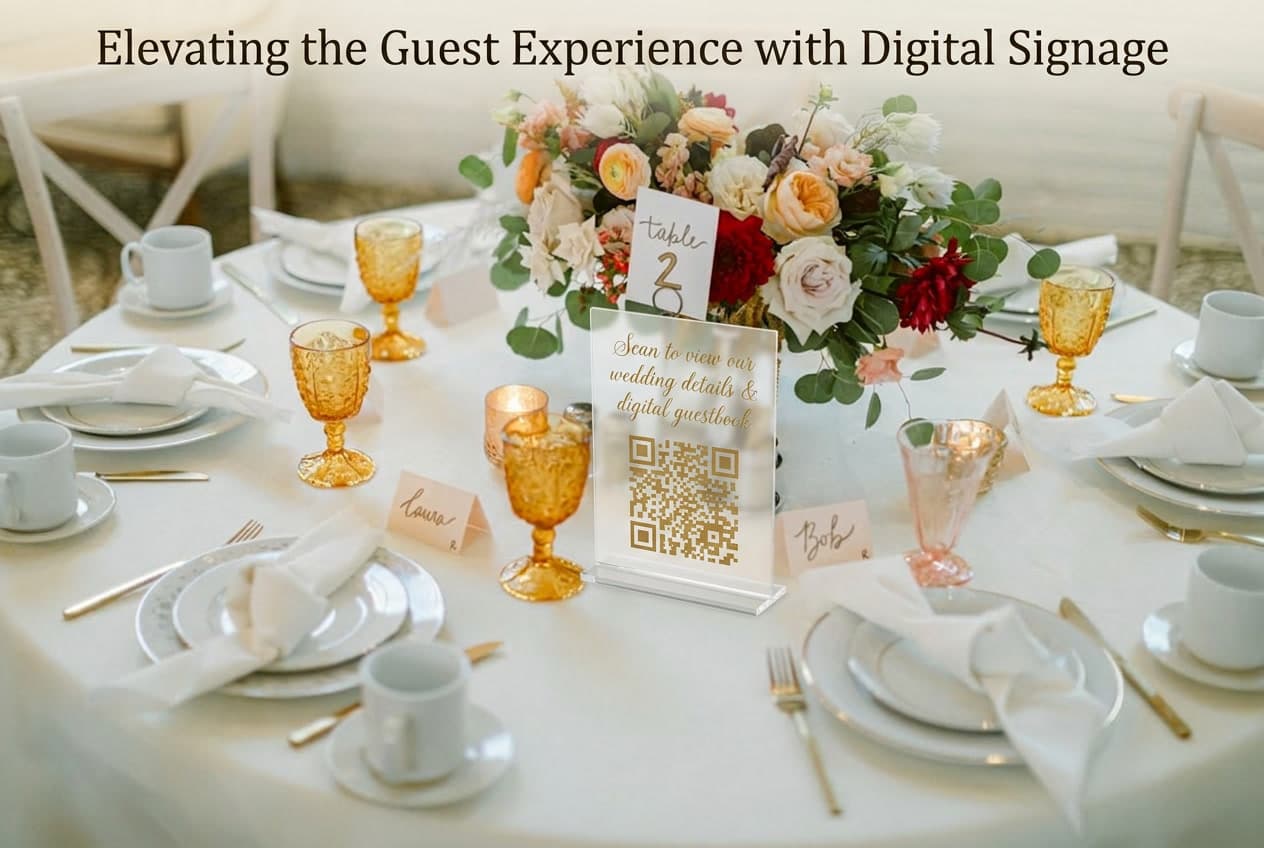
Your wedding QR code sign is doing one job: getting a room full of people — many of whom are already holding their phones — to open the camera app and scan. If the sign is confusing, buried in other signage, or looks like an afterthought, they won't. And those thousands of candid photos your guests took stay on their phones forever.
This guide covers what to write, where to put it, what to print it on, and where to get free templates — so your sign actually works rather than just looking nice on a table.
For context on how this fits into your overall guest photo plan, see the complete guide to collecting wedding photos from guests — the sign strategy here works best as part of a broader system.
What a Wedding QR Code Sign Actually Needs to Do
The sign's only job is to bridge the gap between "guest takes a photo" and "guest uploads it to your album." That gap is usually just friction — they don't know a collection system exists, or they can't figure out how to use it in the moment.
A great QR code sign eliminates that friction in three ways:
- Visibility — guests have to see it, which means placement and size matter more than aesthetics
- Clarity — they need to understand in two seconds what to do and why (share photos with you)
- Urgency — something in the wording makes them do it now, not "later" (later never comes)
Most wedding QR code signs fail the clarity test. They're designed to look beautiful and end up looking like decor. Guests glance at them and move on. The wording is where most couples underinvest.
Free Wedding QR Code Sign Templates
WeddingSnap has a library of free, printable QR code sign templates designed specifically for guest photo sharing. They come in multiple styles — minimal, romantic, botanical, modern — and multiple sizes: 4x6 table cards, 5x7 table signs, and 8x10 venue entrance signs.
Browse and download the free template collection here. Once you create your WeddingSnap event, you can drop your unique QR code directly into any template and send it to print.
What to look for in any QR code sign template:
- The QR code area should be at least 2 inches square at final print size — smaller than that and some phones struggle to scan
- The instruction text should be large enough to read from 2–3 feet away without squinting
- The design should match your wedding palette and signage style, not look like it came from a different event
- Minimal clutter — if there's too much text, guests won't read any of it
If you're building your own in Canva or another design tool, start with a blank template at the correct print size (not screen size) and add the QR code as the centerpiece, not an afterthought squeezed into a corner.
What to Write on Your Wedding QR Code Sign
The wording is where most couples either win or lose guest participation. Short, direct, and personal outperforms clever every time — but a hint of personality keeps it from feeling like an office memo.
The basic formula: [verb] + [what they're doing] + [who it goes to]
Example: "Scan to share your photos with Emma and Jack." That's it. That's a functional QR code sign.
Romantic Wording Options
- "Through your eyes, into our hearts — scan to share your photos"
- "Help us see our wedding the way you saw it"
- "Your perspective is our favorite gift — scan and share"
- "Every angle tells a different story — share yours"
- "Scan to add your photos to our forever album"
Playful and Casual Options
- "Help us see what we missed while we were crying happy tears"
- "Scan here. Upload photos. Be the hero of this wedding."
- "We can't be everywhere at once — help us collect every moment"
- "Future grandchildren will thank you for scanning this"
- "Got a good one? Scan and share it before you forget"
Simple and Minimal Options
- "Scan to share your photos"
- "Share your photos with us — scan to upload"
- "Capture. Scan. Share."
- "Add your photos to our wedding album → scan"
- "[Names] Wedding Photos — scan to contribute"
For the most engagement, include your names in the wording. It makes the sign feel personal rather than generic, and guests respond to "share your photos with Emma and Jack" more than "share your photos here."
Where to Put Your Wedding QR Code Signs
Sign placement matters more than sign design. A beautiful sign no one sees is worse than a plain sign they trip over. Multiple sign placements are the single biggest driver of upload volume — couples who place signs at three or more locations consistently collect significantly more photos than those who rely on one.
The highest-performing placements, in order:
1. Ceremony Exit
Guests are standing around after the ceremony, emotions are high, and phones are already in hand. This is the easiest scan of the entire day. Use an 8x10 or larger sign on a stand at both sides of the exit so it's visible from multiple angles. This placement alone can account for 30–40% of your total uploads.
2. Each Reception Table (Place Cards or Table Cards)
A small 4x6 card at every place setting reaches every guest during dinner — the longest stretch of the event where people have downtime. This is the highest-volume placement for total scans because every single person sits down and has time to engage.
3. The Bar
Guests congregate at the bar throughout the reception, often with nothing to do while they wait. Phone-in-hand, relaxed, looking around — they'll scan something interesting. A 5x7 sign propped on or near the bar is a reliable traffic driver.
4. Next to the Photo Booth or Selfie Station
If you have a photo booth, your guests are already thinking about photos and already have phones out. This is a natural pairing — put the QR sign on the same table or stand.
5. Venue Entrance / Welcome Table
Catches guests as they arrive before the ceremony. They're orienting, looking at signage, and paying attention. A brief mention here primes them for the sign placements later in the evening.
6. Bathroom Mirror (Optional)
Unconventional, but works. A small printed sticker or card near the bathroom mirror catches guests during what is often the most candid photography window of the night — the bathroom selfie. If your venue allows it, a small 3x4 card taped to the mirror frame is low-effort and surprisingly effective.
Sign Design: What to Print It On
The material affects both how the sign looks and whether the QR code actually scans. A few practical notes for 2026:
Acrylic (lucite) stands: The dominant wedding signage material right now. Clear or frosted, printed or vinyl-applied, acrylic photographs beautifully and holds up through a long reception. Ideal for your ceremony exit stand and cocktail hour placement. More expensive — budget $25–60 per piece from most print shops.
Heavy cardstock: Fine for table cards and place settings. Prints cheaply at any office supply store or local print shop. Use 130lb or heavier stock so cards don't wilt during a multi-hour event.
Wood or slate: Trending as an alternative to acrylic for rustic and outdoor weddings. The QR code needs to be printed with high contrast — light backgrounds with dark code, not the reverse.
What to avoid: Glossy laminate. It looks premium but reflects ambient lighting in ways that make QR codes nearly impossible to scan under reception lighting. Use matte finish or unlaminated for anything with a QR code.
QR Code Sign Mistakes That Kill Participation
- QR code too small. At final print size, the code should be at minimum 1.5–2 inches square. Smaller than that and about 30% of guests' phones won't scan it reliably, especially in reception lighting.
- Too much text. If your sign takes more than five seconds to read, most guests won't read it. Every word that isn't the QR code, a verb, and your names is probably unnecessary.
- No verb. "Emma & Jack Wedding Photos" above a QR code tells guests nothing about what to do. Add "scan to share" and participation goes up immediately.
- Only one sign. One sign means guests who don't walk past that exact spot miss it entirely. Plan for a minimum of three placements.
- Low-contrast design. Light code on a light background, or dark code on a dark background, causes scan failures. High contrast between the QR code and its background is non-negotiable.
Tying It Into Your Overall Photo Plan
The sign is the physical touchpoint, but it works best inside a larger system. Before your wedding:
- Create your WeddingSnap event and get your QR code — takes 10 minutes
- Download a template from our free template library, customize with your names and QR code, and send to print
- Brief your MC to mention the QR code twice during the reception
- Place signs at three or more locations on your venue map
For more detail on the full setup process, our guide on how to make a QR code for wedding photos walks through every step. And for the broader context of why this matters, the complete guide to wedding QR codes covers everything from photo sharing to other QR use cases at weddings.
If you're also planning a bridal shower with guest photo sharing, the same sign approach applies — see our bridal shower QR code ideas for wording and placement that works for smaller events.
Frequently Asked Questions
How big should a wedding QR code sign be?
Print the QR code itself at a minimum of 2 inches square so it scans reliably from arm's length. For table cards, 5x7 inches works well for the overall sign. For venue entrance signs, go 8x10 or larger so guests can scan from several feet away without walking up to it.
What should I write on my wedding QR code sign?
Keep it short: a verb (scan, share, upload), what they're doing (sharing photos from tonight), and who they're sharing with (your names). "Scan to share your photos with Emma and Jack" is a complete, effective sign. You can add a playful second line if it matches your personality, but the core message needs to be instantly clear.
Can I get a free wedding QR code sign template?
Yes — WeddingSnap offers free downloadable templates at weddingsnap.io/free-templates in multiple styles and print sizes. Once you create your event, your QR code drops directly into any template.
Where should I put my wedding QR code sign?
The three highest-performing placements are the ceremony exit (phones already out, emotions high), each reception table (every guest has downtime during dinner), and the bar (guests standing around waiting). If you only have budget for one sign, the ceremony exit delivers the most scans per sign.
What material should I print my wedding QR code sign on?
Acrylic is the most popular choice in 2026 and photographs beautifully for venue and exit placements. For table cards, thick cardstock (130lb+) is cost-effective and perfectly functional. Avoid glossy laminate — it reflects ambient lighting and makes QR codes difficult to scan in a reception environment.
Ready to get your signs sorted? Browse the free WeddingSnap template library — pick your style, customize with your names and QR code, and send to print. Takes about 15 minutes from start to order confirmation.