Digital Guest Book Wedding Ideas That Actually Work (2026)
WeddingSnap Team
7/20/2026
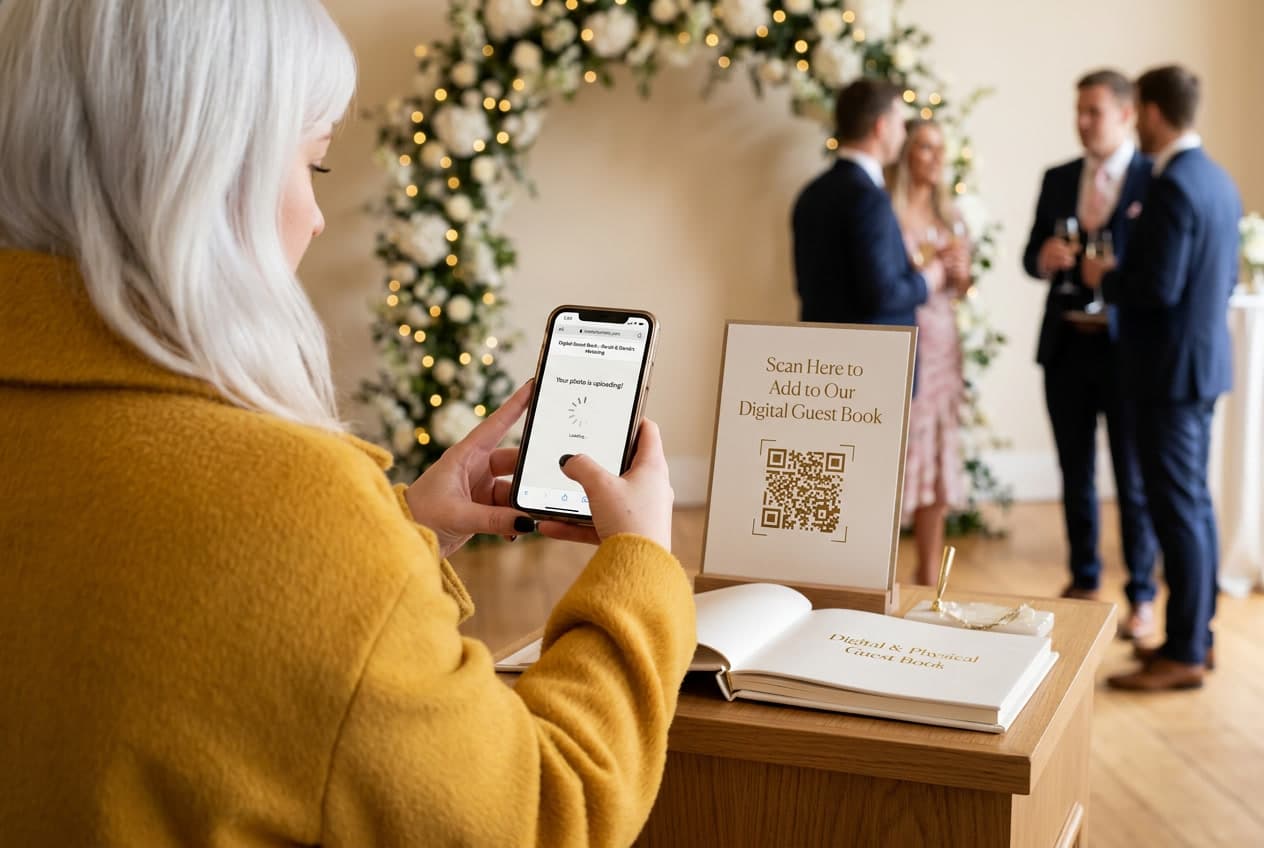
Open any wedding guest book from the last twenty years and you'll find the same sentence written forty different ways: "Congrats! Love, Aunt Sue." Maybe a heart. Maybe a date. That's the whole artifact — a $60 leather-bound book of signatures you will open exactly once, at your one-year anniversary, before it goes back in the closet.
The digital guest book wedding trend didn't take off because couples suddenly love technology. It took off because the paper book has a known failure mode, and everybody who has ever gotten married knows what it is.
Here's our stance, and it's the thing most "best digital guestbook" roundups won't say out loud: the best digital guest books are photo-first, not text-first. Guests will always give you a picture before they'll give you a paragraph. Build around that, and you get a keepsake worth revisiting. Build around a blank text box, and you've just rebuilt the paper book with worse handwriting.
Why the paper guest book fails (and it's not the guests' fault)
The Knot's Real Weddings research found roughly 70% of couples still put out some kind of guest book. So the appetite is there. The format is the problem.
Think about the physical setup. The book sits on a table near the entrance. Guests walk past it during the exact fifteen-minute window when they are looking for their seat, holding a clutch and a drink, and trying to find the person they know. Writing something meaningful requires stopping, thinking, and composing under mild social pressure while a line forms behind you.
Nobody does that well. So they write "Congrats!" and move on. The failure isn't emotional — it's logistical.
A photo, by contrast, takes two seconds and zero composition. Your guests are already holding the device. They're already taking pictures. A photo-first digital guest book doesn't ask them to change their behavior; it just gives that behavior somewhere to land.
What a digital guest book actually is in 2026
The category has split into three real formats, and they are not interchangeable.
- Photo-first. Guests scan a QR code and upload photos and short videos to a shared gallery, usually with an optional caption. The caption is where the message lives — attached to an image, which is why people actually write one.
- Audio-first. A vintage phone handset guests pick up to record a voice message. Genuinely lovely, genuinely limited — you get maybe a dozen recordings from a 120-person wedding, and you need somewhere quiet to put it. We wrote a full breakdown of how to run one in our wedding audio guest book guide.
- Text-first. A web page with a message box, sometimes an iPad kiosk. This is the digitized version of the paper book, and it inherits the paper book's exact problem. Same blank box, same "Congrats!"
Pinterest is a useful tell here. Search digital guest book right now and the pins that dominate are QR code signs with a photo prompt on them — "scan to add your photos" — not message boards. The Etsy sellers who've optimized hardest for the search term are all selling printable QR signage. The market voted for photos.
Our data: your guest book has a fifteen-minute window
Something that gets ignored in every guest book roundup we read: when your wedding happens shapes how your guest book performs, because it shapes how compressed your reception is.
Across the weddings running on our platform, roughly 6 in 10 happen on a Saturday. Friday is a distant second at about 1 in 5, and around 85% of all events land somewhere in the Friday–Sunday block. Monday is the rarest wedding day by a wide margin.
That concentration matters. Saturday evening weddings run on the tightest timeline of any format — ceremony, cocktail hour, dinner, dancing, out by eleven because the venue said so. There is no leisurely stretch where guests wander over to a table and reflect. Whatever your guest book is, it has to work inside a fifteen-minute cocktail-hour window, in low light, while people are mingling.
Seasonally, April through June accounts for nearly half of our annual event volume, with May the single busiest month. And November is a quietly strong off-season month, outpacing several spring months — worth knowing if you're still picking a date.
What this means practically: peak-season Saturday weddings are the ones where a text-first guest book collapses hardest. Everything is running ten minutes behind, the room is loud, and asking someone to compose a paragraph is asking for a favor they don't have time to give. A QR code they scan once and use all night is the only format that survives that timeline.
How to build a photo-first digital guest book
The setup is genuinely short — most couples we talk to do it in an evening.
Pick your platform before you print anything. The one non-negotiable feature: guests should not have to download an app. Every install step you add cuts participation, and the guests you lose first are the older relatives whose photos you'd most want. Browser-based upload via QR code is the standard now, and it's the approach we go deep on in our guide to wedding guest photo ideas.
Write a prompt, not an instruction. "Scan to upload photos" gets you photos. "Scan and show us the moment you'll remember" gets you photos with captions — which is how you smuggle the guest book messages back in. The caption field only gets used when the sign gives people a reason to use it.
Put signage in more than one place. One sign at the entrance is the paper-book mistake repeated. Put small cards on dinner tables, one at the bar, one near the dance floor. The bar sign consistently pulls the most uploads, for reasons we don't need to explain.
Show the gallery live if you can. A slideshow on a screen turns uploading into a social act — guests see their photo appear, and the person next to them wants theirs up too. This is the single biggest lever on upload volume.
Assign someone who isn't you. A bridesmaid or a cousin who scans the code early and posts the first four or five photos. Empty galleries stay empty; galleries with a few photos in them fill up fast.
Mistakes we see repeatedly
- Burying the QR code in the invitation suite. People throw away paper. The code needs to exist at the venue, on the day.
- Choosing a platform that deletes your gallery after 30 days. Read the retention terms. A guest book you lose in a month isn't a keepsake.
- Skipping the printed backup entirely. A photo book made from the gallery afterward gives you the physical object the paper guest book was supposed to be — except this one has faces in it. We covered the layout side of that in our wedding guest book photo album guide.
- Relying on a hashtag. Instagram hashtags stopped functioning as collection tools years ago, and the photos you want most are from the guests who don't post. If you're weighing this, our wedding hashtag alternative breakdown covers why.
Do you still need a physical guest book?
You can run both, and plenty of couples do. If you want a signed object on the wall, use a signing print, a wooden puzzle, or a framed photo mat — something guests sign in five seconds because there's nothing to compose. Then let the digital gallery carry the actual memories. We've got a longer list of formats in our wedding guest book alternatives post.
What doesn't work is running two things that both ask for written messages. Guests will do one, and it'll be the shorter one.
The 2026 shift worth noticing
The wider context is that couples are simply more comfortable with wedding tech than they were two years ago — The Knot Worldwide's 2026 Real Weddings Study found adoption of digital planning tools climbing sharply, particularly among Gen Z couples. The guest book was always going to be one of the first paper traditions to go.
Two things changed this year. First, the unplugged ceremony and the digital guest book stopped being in conflict — couples are asking guests to put phones away for the vows and then explicitly inviting them back out for the reception. The QR sign at the cocktail hour entrance has become the handoff point between those two modes.
Second, the definition of "guest book" quietly widened to include video. Ten-second clips of guests saying something at the bar are outperforming written messages by a wide margin in every gallery we see, and most photo-first platforms now accept them by default. If your platform is photos-only, that's a real limitation in 2026.
Frequently asked questions
What is a digital guest book for a wedding?
A digital guest book lets wedding guests leave photos, videos, or written messages from their phones, usually by scanning a QR code at the venue. Unlike a paper book, everything is collected in one shared gallery you keep after the wedding.
Do guests need to download an app?
They shouldn't. The best online wedding guest book tools work entirely in a phone browser — guests scan a QR code and upload immediately. Any platform requiring an app install will cost you participation, especially from older guests.
How much does a digital wedding guest book cost?
Most sit between $30 and $200 as a one-time cost, depending on gallery size and how long your photos are stored. Audio guest book rentals run higher because there's hardware involved. Check WeddingSnap's pricing for a current comparison point.
Can I still get a printed keepsake?
Yes — and you should. Export the gallery after the wedding and turn it into a photo book. You end up with the physical object the paper guest book promised, except filled with images rather than signatures.
What's the best digital guest book format?
Photo-first, with captions enabled and video allowed. Text-only formats repeat the paper book's problem. Audio is a great addition but a weak primary, because volume is low.
Getting started
If you're planning a peak-season Saturday — and statistically, you probably are — the guest book decision is really a decision about what your guests can realistically do in a fifteen-minute window. Photos, they'll do. Paragraphs, they won't.
Set up a photo-first digital guest book in a couple of minutes → see WeddingSnap plans, or grab a free QR code sign template to print for your welcome table.